
SkyTeam destinations in Bonussøk: browse available trips month by month
Sometimes you know you want to travel somewhere in February, but not where. SkyTeam destinations, also called Award Finder, is built for exactly that way of thinking: start with the timing, not the place.
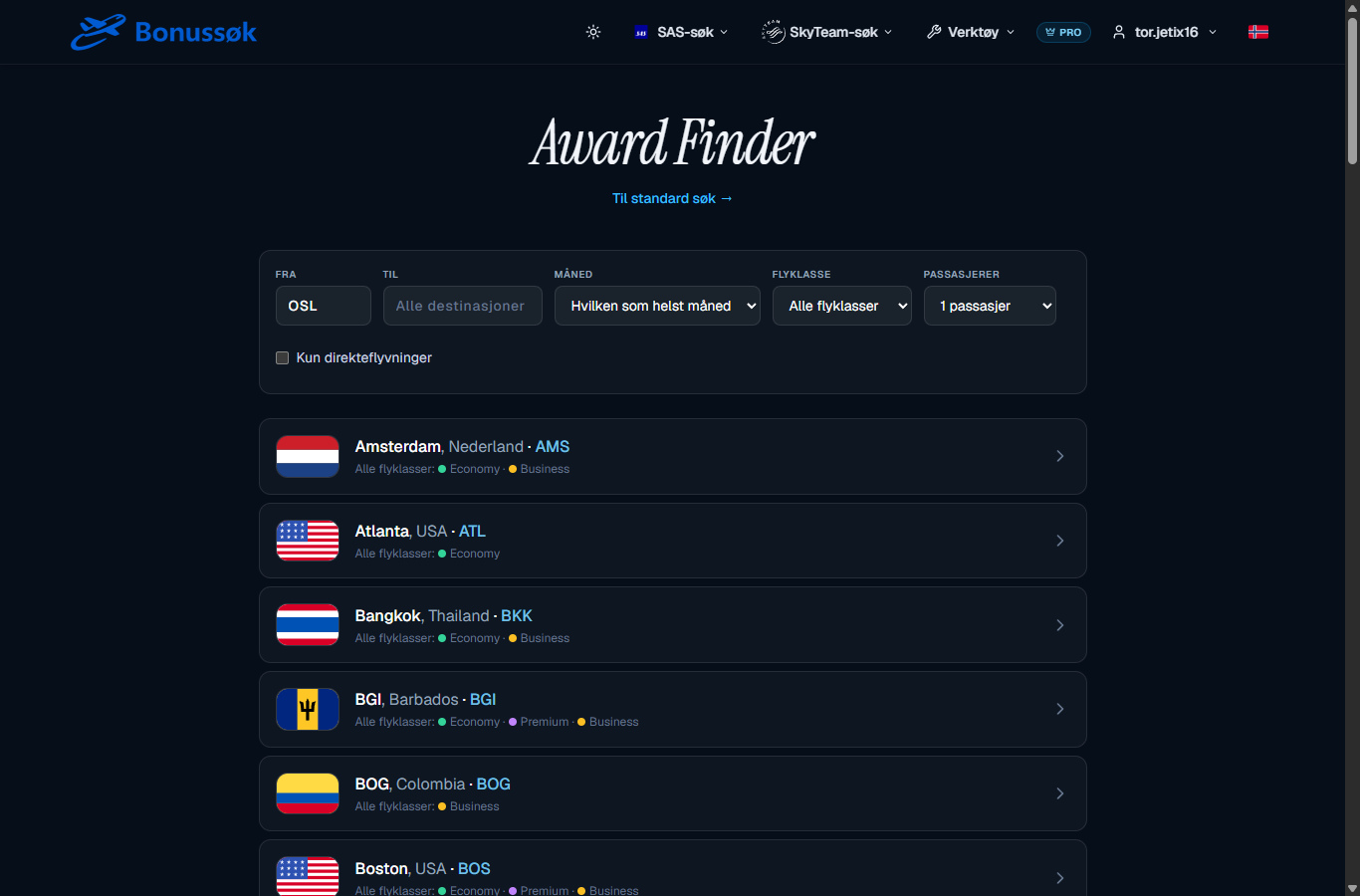
What it does
Instead of searching one specific route, SkyTeam destinations lets you browse which partner destinations have open award seats, sorted by month. It flips the search from “does this route have a seat” to “where can I go this month”.
How to use it
You start from a hub, OSL for example, and let the destinations come to you. Above the list you’ll find a few simple options:
- Departure airport and an optional destination, or “all destinations” if you’re completely open.
- Month, so you see what’s free in exactly the period you’re considering.
- Cabin class, if you want to limit yourself to a particular cabin.
- Number of passengers.
- A checkbox for direct flights only, if you’d rather skip layovers.
For each destination you immediately see which classes are open, marked with coloured dots for Economy, Premium and Business. You don’t need to open each route to tell whether there’s anything there. A quick glance does it.
An example
Say you fancy some sun in February but haven’t decided where. You set the from field to OSL, the month to February, and browse. The list fills up with destinations that have seats free, from major cities in Europe to long trips towards Asia, each with dots showing which cabins are open. You pick the one that tempts you most and go from there. That’s far quicker than guessing your way through ten routes one by one.
Why it’s useful
The partner network is big, and it’s easy to get lost if you have to guess at both the place and the date. When the tool lays the destinations out in front of you by month, making a decision gets much easier. You see the options together and pick the one that appeals.
It works nicely alongside the SkyTeam map, which gives you the geographic overview, and the SkyTeam search, which confirms specific dates once you’ve decided. If you’d rather have ready-made round-trip suggestions, take a look at ready-made SkyTeam trips.
Who it’s for
This is for the flexible traveller who lets the supply steer the destination. If you’ve already settled on both the place and the date, go straight to the search. But if you’re open about where, Award Finder is the fastest route to an idea. It’s part of the SkyTeam tools on the Pro tier. See plans and pricing for what’s included.
Common questions
What do the coloured dots on each destination mean? They show which cabin classes are available: Economy, Premium and Business. That way you can read the availability without opening the route.
Can I limit it to direct flights? Yes. There’s a checkbox for direct flights only if you want to avoid layovers.
What’s the difference between this and the SkyTeam search? Award Finder answers “where can I go this month”. The SkyTeam search answers “does this specific route have a seat on these dates”. They complement each other.
Explore SkyTeam destinations and find where you can go next month.